Integrations
Where alert delivery and cross-cutting platform behavior are configured: which channels get which
severities, whether infra spans correlate with agent traces, and your analytics consent. Reached
via the user menu; /settings/notifications redirects here.
What you see
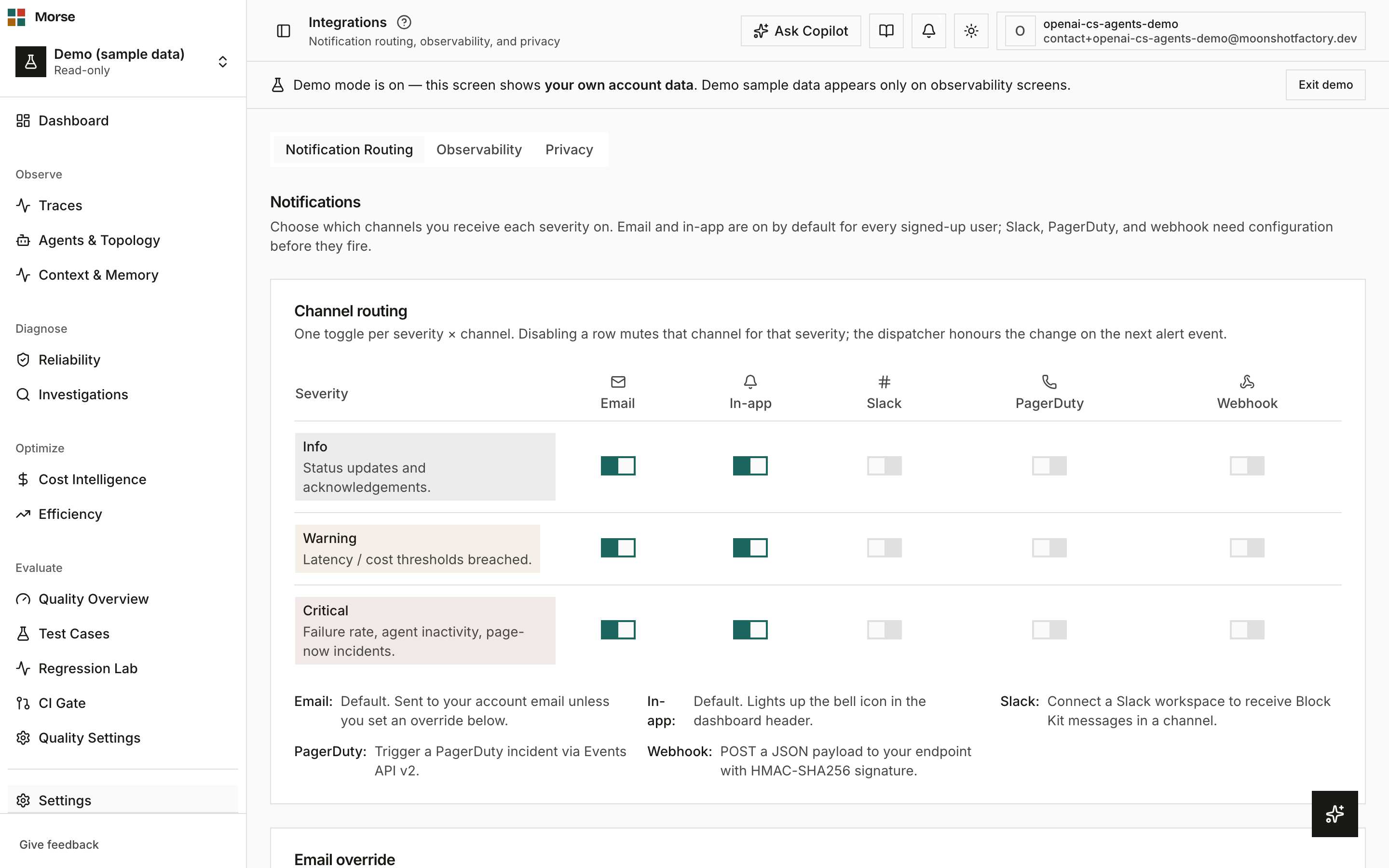
Three tabs: Notification Routing (default), Observability, and Privacy.
Channel routing
A grid of 3 severities (Info, Warning, Critical) by 5 channels (Email, In-app, Slack, PagerDuty, Webhook) — one toggle per cell. Email and in-app are on by default for every account; Slack, PagerDuty, and webhook need their own configuration below the grid before they fire.
Slack connects via a workspace-connect button, PagerDuty needs an integration key, and webhook needs a URL and a signing secret — outbound webhook payloads are signed with HMAC-SHA256.
You can also set an email override address so critical alerts route somewhere other than your account email.
Observability
Two toggles — HTTP infra spans and Database infra spans — that control whether HTTP and database spans from your own OTel instrumentation (any framework, any database or driver) correlate with your AI agent traces on the same trace. Both default on; turning one off drops those spans at ingest going forward (existing traces are unaffected).
Privacy
An Analytics toggle for anonymized product-usage analytics consent — the same setting the in-app consent notification’s Accept/Decline actions update.
How to use it
- Toggle a cell in the channel grid to mute or enable that severity on that channel; changes take effect on the next alert.
- Configure Slack, PagerDuty, or webhook before relying on them — an enabled-but-unconfigured channel won’t deliver.
- Turn off HTTP or DB infra spans if you already have separate infra/APM tooling and only want AI traces here.
- Set analytics consent once — it stays in sync whether you change it here or from the consent notification.
Before you have data
The grid isn’t hidden until you configure a channel — it always renders with Email and In-app
already on. Enabling Slack, PagerDuty, or webhook before you’ve connected them is safe: the
dispatcher no-ops those rows with a documented not_implemented failure instead of erroring.