CI Gate
A CI gate blocks a bad deploy before it ships, with no dependency on the GitHub API specifically — the caller’s own CI step polls a REST endpoint and the caller’s branch protection acts on the result.
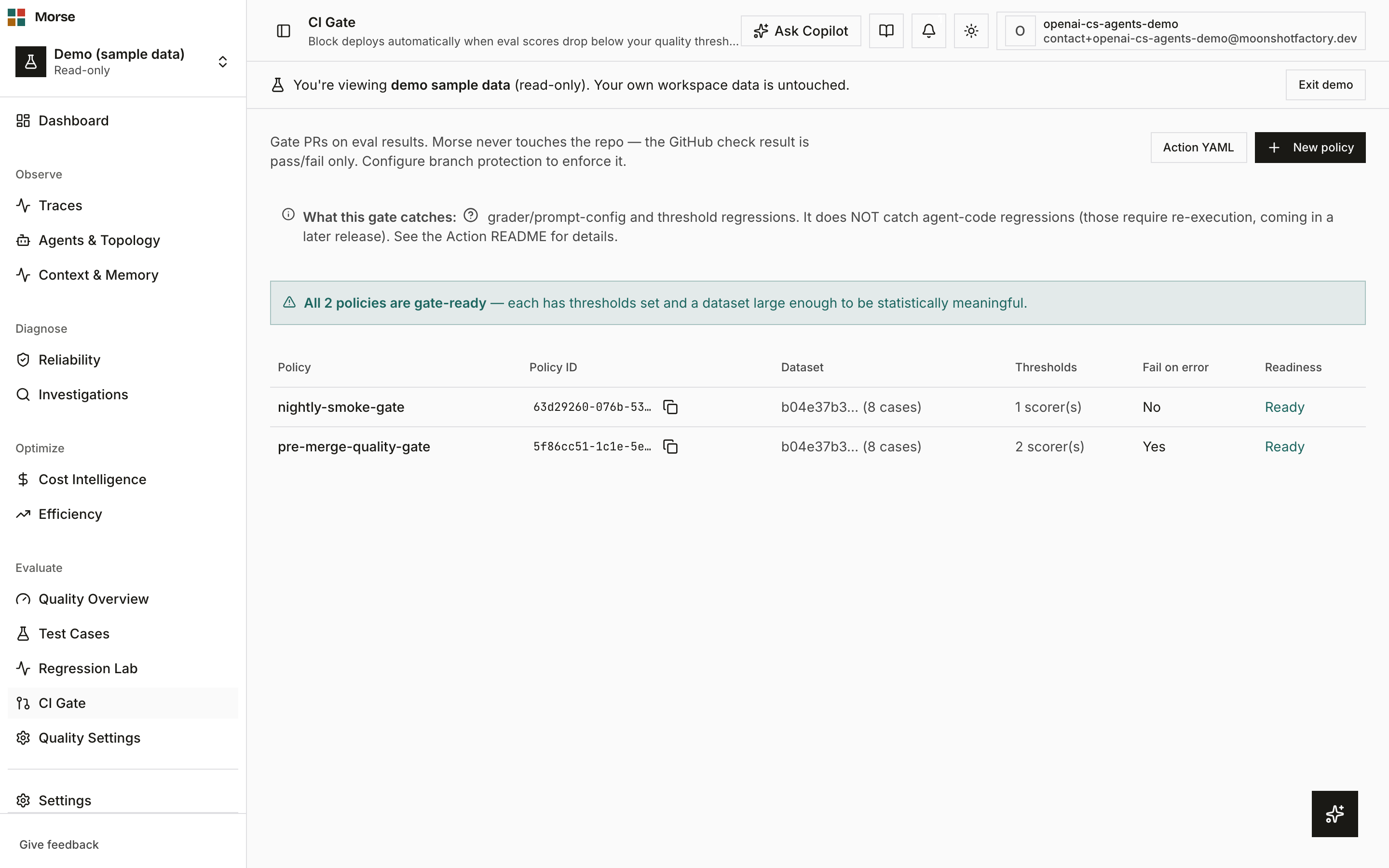
What you see
How the gate works
An explanatory line states plainly that Morse never touches your repo — it returns a pass/fail result and your branch protection is what actually enforces it.
An honesty callout goes further: the gate catches grader/prompt-config and threshold regressions, not agent-code regressions — those need re-execution, which isn’t shipped yet.
Action YAML toggles a copy-pasteable GitHub Actions workflow snippet that calls the CI-scoped
POST /evals/ci/run endpoint with an API key carrying the ci scope.
The CI-facing endpoints are async: POST /evals/ci/run enqueues and returns 202 immediately;
the caller polls GET /evals/ci/run/{id} until the verdict is completed. There’s no
bounded-sync endpoint in v1.
Policies
A readiness summary banner states how many of your policies are gate-ready versus how many “gate nothing meaningfully yet.”
A policy is flagged weak when it has no scorer thresholds set, or when its dataset has fewer than 5 cases — either condition means the gate will pass regardless of agent behavior.
The policies table lists each policy’s name, a copyable policy ID, its bound dataset (with case count), scorer-threshold count, fail-on-error setting, and readiness.
New policy opens a dialog to create a policy from a name and a dataset; thresholds are configured after creation.
How to use it
- Create a policy against a dataset, then set its per-scorer thresholds so it can actually fail a run.
- Open Action YAML, copy the workflow snippet into
.github/workflows/, and wire your branch protection rule to the resulting check — Morse’s role stops at the pass/fail verdict. - Watch the readiness banner: a “weak gate” flag means the policy is live but toothless until you add thresholds or grow the backing dataset past 5 cases.
- Copy a policy ID with its dedicated copy button when filling in the workflow’s
policy-idinput.
Before you have data
With no policies yet, the page reads “No eval policies yet” with a Create your first policy button in place of the table.
Related
- Cases — the datasets a policy binds to and gates on.
- Regression Lab — where replay runs establish the scores a policy checks.
- Evals — CI Gate readiness surfaces here as an always-visible next action.